Industries/Landscaping
Installs & maintenance

Landscaping software that quotes, schedules and invoices

A patio is a quote with a deposit, three crews and a final walk-through. Maintenance is the same customer every other Tuesday. Both live on one record, and both get paid without a chase.

Hardscape & patiosPlanting & bedsSod & gradingIrrigationRetaining wallsMaintenance contracts
A landscaper mowing a lawn in golden-hour light
Landscaping
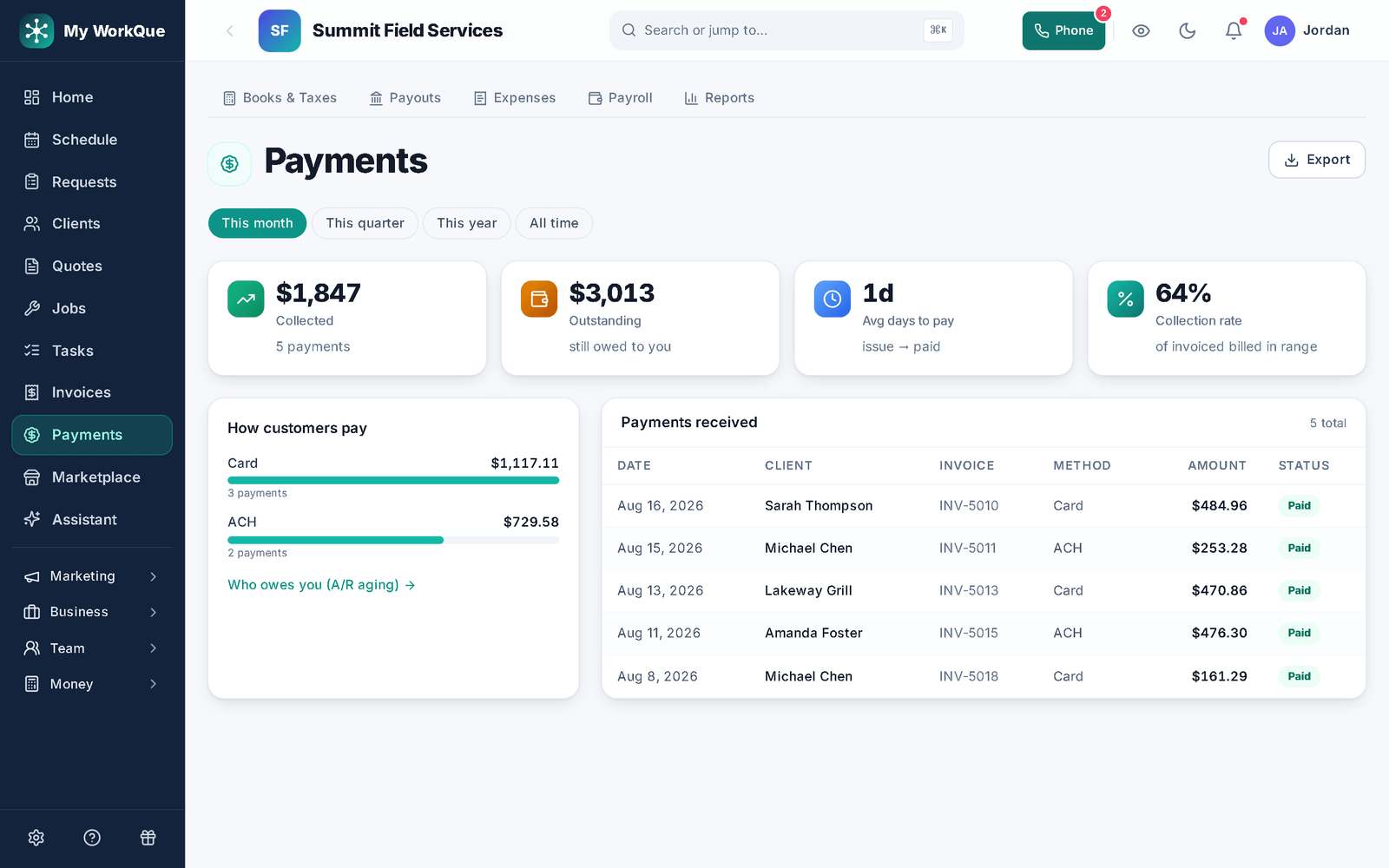
The payments screen: collected, outstanding, average days to pay and collection rate, with the list of recent payments
Collected, outstanding, days-to-pay — the money side of the projects, in one place.
The day-to-day

Three things that go wrong — and what happens instead

Deposits & payment plans

A $30,000 job that starts before a dollar is in.

Require a deposit on the quote — percent or fixed — collected online when the customer signs. Put the balance on a payment plan for the big ones. Every payment posts to the job, so the office sees what is in and what is due without a spreadsheet.

Itemized quotes & job costing

The estimate was a guess and the profit was a surprise.

Quotes are itemized by unit — each, linear ft, sq ft, hour, job — with cost and markup on every line, and photos on the lines that need them. Job costing shows what the job actually made against what you quoted.

Crews & dispatch

Three crews, two trucks, one phone doing dispatch.

Assign a job to more than one person, see the week by crew, and drag today's unscheduled jobs onto the right tech on the dispatch board. Crews check in by GPS on the time clock and tick off a checklist before the customer signs off.

Day one

What you can do on day one

Every item is a screen you can open the day you sign in.

  • Import your customer list from a spreadsheet or your old app.
  • Build a quote template so the next quote starts filled in.
  • Require a deposit on the quote, as a percent or a fixed amount, collected when they approve.
  • Turn on automatic quote follow-ups, so nobody has to remember to chase.
  • Build a job checklist your crew ticks off in the field, with a customer sign-off at the end.
  • Set a job to repeat — weekly, every 2 weeks, monthly, quarterly or seasonal — and it books the next visit when this one is completed.
  • Send an invoice and take a card payment online from the link — bank transfer, check and cash are recorded when they arrive.

From the sketch to the sign-off.

Quote it by the square foot, collect the deposit, dispatch the crews, sign it off, invoice the balance — one record.

Questions

Landscaping FAQ

Can I take a deposit and then progress payments?

Yes. Set the deposit on the quote; the customer pays it when they approve. Payment plans (on Pro) split the balance; each payment posts to the same invoice and the client hub shows what is left.

Can the customer sign the quote online?

Yes — they draw or type a signature, agree it is their electronic signature, and pay the deposit in the same step. The signed agreement is kept on the record and in their client hub. E-sign approvals are on Pro and above.

Can I run maintenance and installs on the same calendar?

Yes. Maintenance repeats on its schedule; installs are one-off jobs with as many visits as they need. The customer record shows both.

Do you send me leads?

Yes, if you want them. Homeowners post jobs in the Hire-a-Pro marketplace; jobs matched to your trade and service area land in your Requests queue with no per-lead fee. Local leads are included on the Business plan, or you can add the Local Leads module to Starter or Pro for $49/mo.

Which plan do I need?

Starter covers the CRM, scheduling and calendar, quotes and invoices, the customer email inbox, the time clock, free CRM import and the mobile app. Pro adds the client portal, e-sign approvals, the dispatch board, GPS time clock, marketing automation, reviews, job costing, payment plans and the website builder. Business adds accounting with bank feeds, sales tax, payroll, the sales pipeline, the ads manager and local leads. Prices are on the pricing page.

Does it work on a phone in the field?

Yes. It runs full-size in any browser on your computer, and on a phone it installs to the home screen straight from the browser. Same account, same data, whichever you pick up.

Can I bring my customers and quotes with me?

Yes. Import clients, quotes and inventory from spreadsheets or the app you are leaving. It is included on every plan, and your data stays exportable afterwards.

Ready to run the projects and the routes in one place?

Deposits in, crews out, invoices paid.

Book a demo