Job done. Invoice out.
Money in.
One click turns a finished job into an invoice with the quote's discount, tax rate and deposit already on it — then the overdue reminder chases the balance so you don't have to.
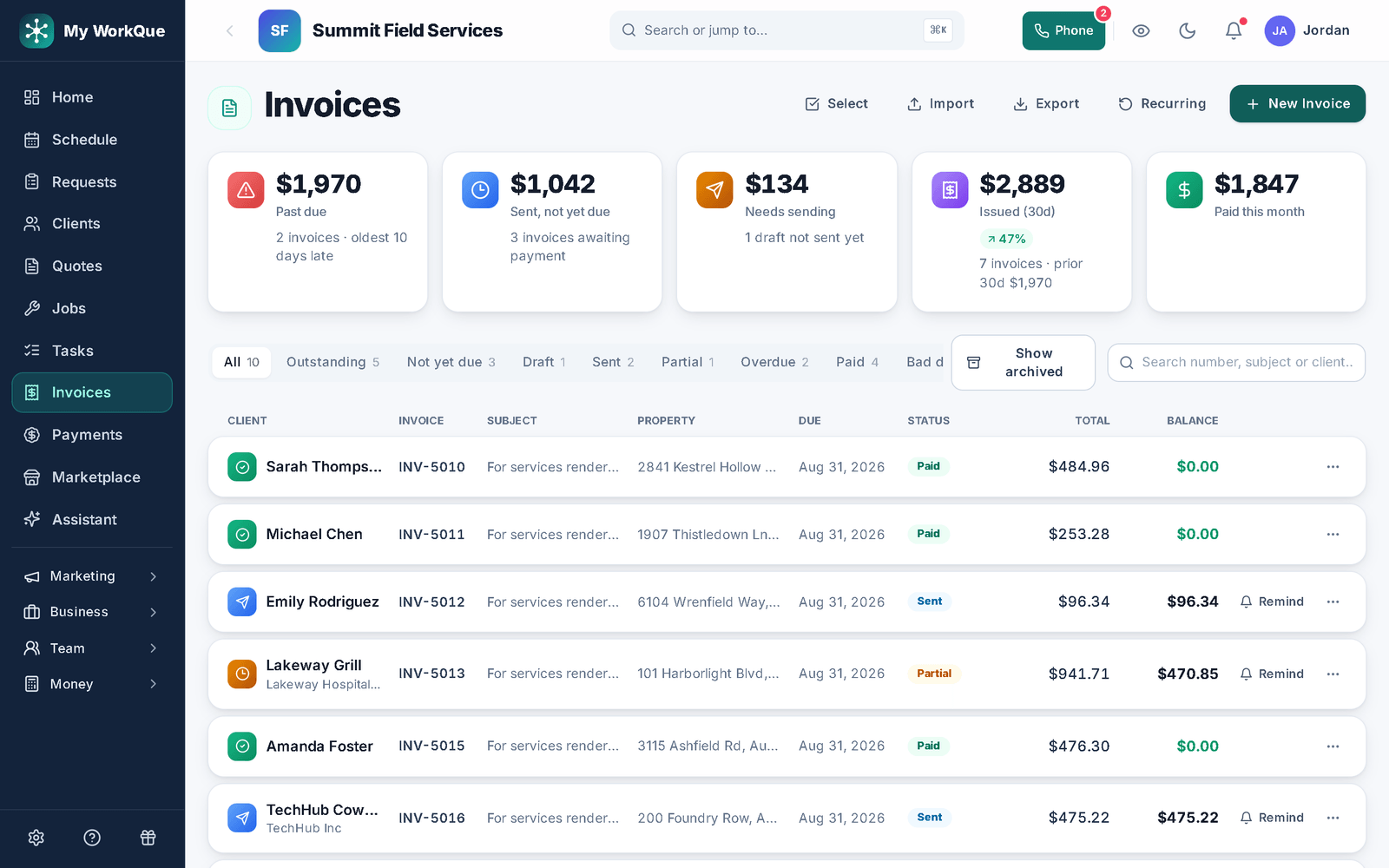
From the last screw to the first dollar
- 01
One click from the job
On a finished job, Create Invoice mints the invoice from the job's line items with the discount and tax rate agreed on the quote — a percent discount is recomputed from the invoice's own lines, a flat one is carried as-is — and your default terms set the due date (Net 15 out of the box; anything from due on receipt to Net 60 or end of month). It's idempotent: a double-tap can't make two. If the job used materials, it asks what's left over before you leave.
In the appCreate InvoiceDue on receiptNet 15Due end of month
- 02
Deposits carry forward
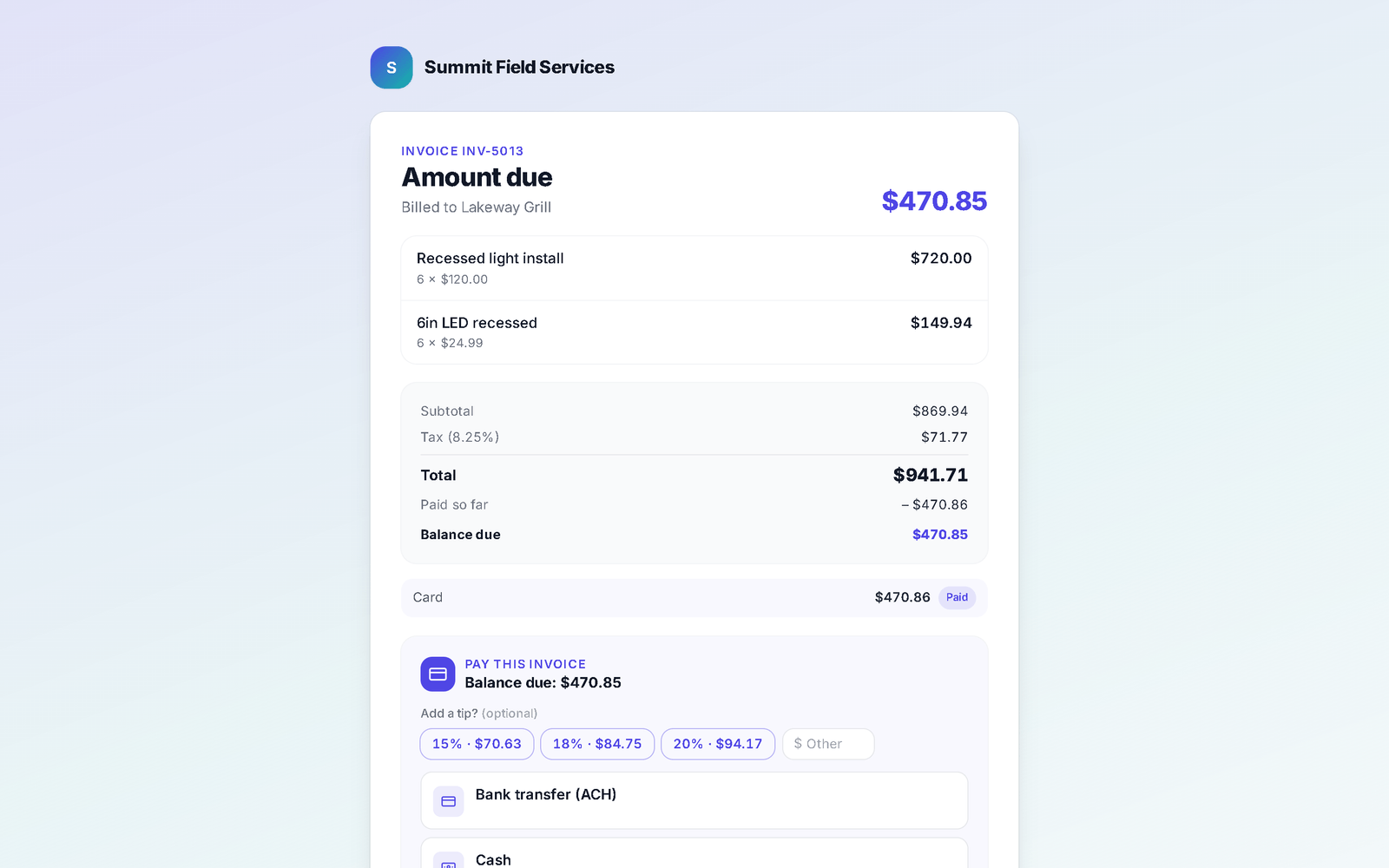
A deposit paid on the quote is credited on the invoice the moment it's created — the customer is never asked for it twice, and the invoice starts as partial instead of unpaid. A deposit the customer said they'd pay by check rides along as pending until you confirm it arrived, so the overdue reminder can't chase money already handed over.
In the appDeposit collectedPartial
- 03
Past due, split out honestly
The strip shows Past due and Sent, not yet due as two tiles that add up — not an "outstanding" number that secretly includes the overdue one. You see how many invoices are late and the oldest days late; every overdue row carries one chip with both facts. Filter by Overdue, Outstanding, Not yet due, Draft, Sent, Partial or Paid, and write off the genuinely uncollectable as bad debt (undoable).
In the appPast dueSent, not yet dueMark as bad debt
- 04
Reminders that go out on their own
Two named rules do the chasing. Overdue invoice: when an invoice passes its due date with a balance, the customer gets a payment reminder by email and text with the link to pay. Job done — bill it: when a job is marked complete but has no invoice, the office is nudged to bill it. And on any unpaid row, Remind sends one by hand.
In the appOverdue invoiceJob done — bill itRemind
- 05
The customer's page leads with what they owe
Their invoice shows the balance first (the total sits underneath on partials, so the math is clear), the attachments you shared, and the ways to pay: card on Stripe's secure page, a tip if they like, the card fee shown up front when you pass it through, or "I'll pay by check" so you know it's coming. In person, show the invoice's own scan-to-pay QR code and they pay on their phone.
In the appPay by cardShow QR code (scan to pay)Attachments
Where this differs from Jobber
Only the rows where there's a real difference — including the ones Jobber wins. The full table is on the comparison page.
| Feature | My WorkQue | Jobber |
|---|---|---|
| Client hub with e-sign & part-payments | ✓ | ✓ |
| Bookkeeping built in, with payroll calculations (not filing or direct deposit) | ✓ | — (QuickBooks sync) |
| Consumer financing offered inside the quote | — | ✓ via Wisetack |
Based on each vendor's public feature and pricing pages plus a hands-on walk of a live Jobber account, August 2026. Plans change — verify with each vendor.
Fair questions
Can a customer pay part of an invoice?
When you enable partial payments for them, they choose an amount and the remainder stays on the invoice. Payment plans go further — installments on a schedule with an optional fee and a contract to agree to — and they are on every plan; see payments.
Where do payments go once they're recorded?
Into the built-in books. A deposit becomes income the moment the invoice is created from the job, and every later payment posts to the same ledger — accounting, bank feeds and sales tax are included on the Business plan (see pricing).
Can I collect several invoices in one link?
Yes. Select the invoices for one customer and Combine into pay link: they see each invoice, one combined balance, and can pay it all or one at a time — and the payment is recorded per invoice underneath, so the books and job costing stay right. There's an account Statement on every client for the ones who want the whole history.
What terms can I set?
Due on receipt, Net 7, Net 15, Net 30, Net 45, Net 60, or due at the end of the month. The default is set once in Settings → Payments and applied to every new invoice; change it per invoice when you need to.
It all runs on the same records
A quote becomes the job, the job becomes the invoice, the payment lands in the books — no re-typing between apps.
Quotes
Templates, optional lines, e-sign and deposits.
See how it works →Scheduling & Dispatch
Calendar views, a drag-to-assign dispatch board, on-my-way texts, GPS time clock.
See how it works →Payments
Cards on Stripe through your own account, deposits, plans, every method recorded.
See how it works →Client Hub
Where your customers approve, sign, pay, prep, and refer a friend.
See how it works →Comparisons
Good / better / best in one link the customer compares and chooses from.
See how it works →Automations
Follow-ups and reminders that run themselves — by their real names.
See how it works →Mobile
The whole app on the phone — installed straight from the browser.
See how it works →
Stop being the last person to get paid.
Start your 14-day free trial.