Industries/Cleaning
Residential & commercial

Cleaning software that quotes, schedules and invoices

Recurring clients are the business. Book each one once, put the checklist on the cleaner's phone, let the recurring invoice and its reminders collect, and ask for the review while the house still smells clean.

Recurring homesMove-in / move-outDeep cleansAirbnb turnoversOfficesPost-construction
A cleaner mopping a commercial floor
Cleaning
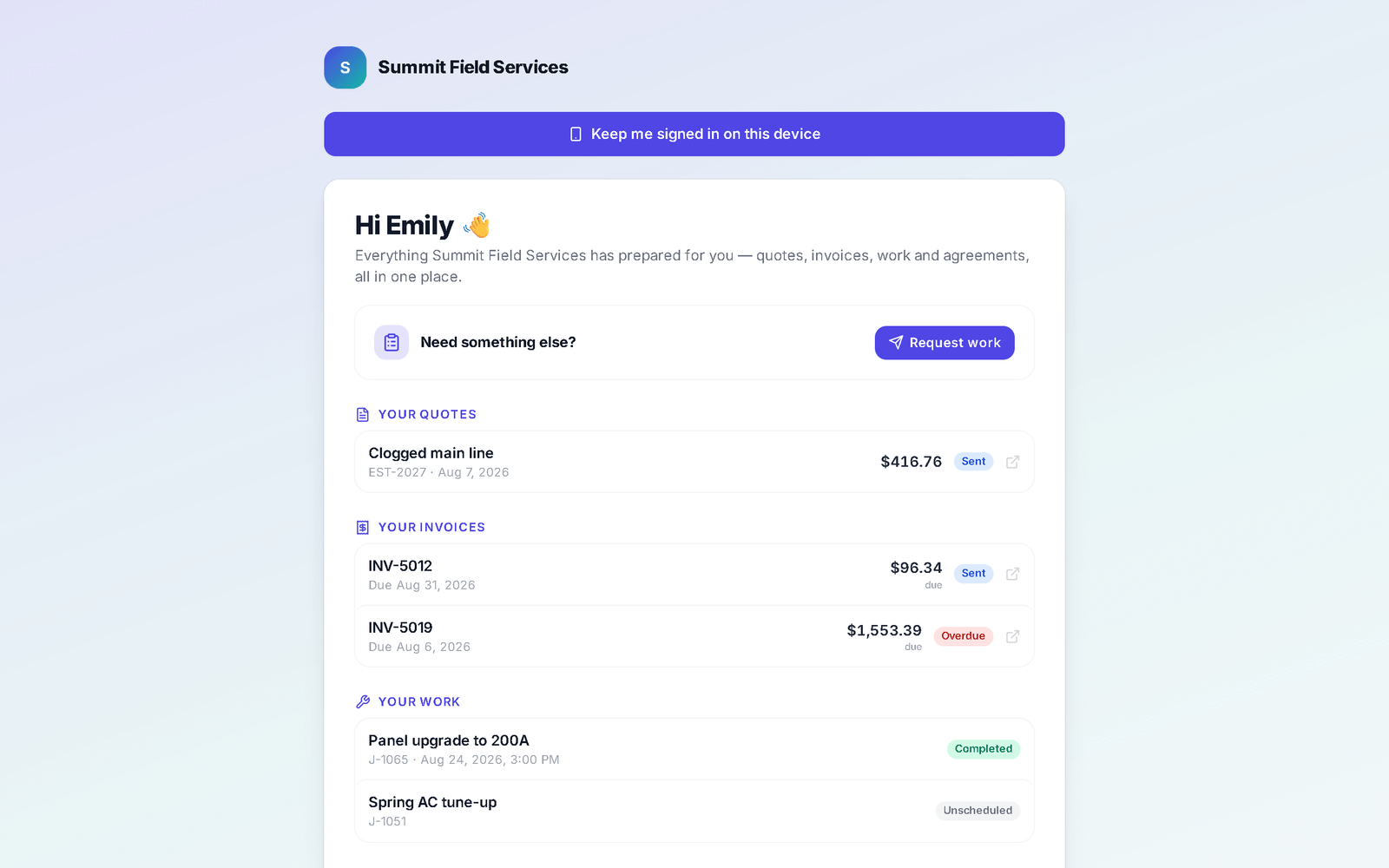
The client hub as a customer sees it: a Request work card, their quotes, their invoices with the balance due and an Overdue chip, and their work with each job's status, in the business's branding
The customer's own page — their quotes, their invoices with what they owe, their visits, and a Request work door at the top.
The day-to-day

Three things that go wrong — and what happens instead

Recurring visits

The same forty houses, re-booked by hand every month.

Set the visit to repeat weekly, every 2 weeks or monthly and completing it books the next. The customer's hub shows the next date; the arrival-window text goes out on its own; a reassignment is one drag on the dispatch board.

Checklists & sign-off

"You missed the baseboards" — with no way to prove otherwise.

Build the checklist once and attach it to the job. The cleaner ticks it off on the phone; the customer gets a sign-off list after the visit that freezes when they sign. Photos and notes stay on the job.

Recurring invoices & reminders

Chasing $180 forty times a month.

Set up a recurring invoice per standing account and it issues itself on the schedule with an online pay link; anything past due gets an automatic reminder. Grouped pay lets a customer clear several invoices in one go.

Day one

What you can do on day one

Every item is a screen you can open the day you sign in.

  • Import your customer list from a spreadsheet or your old app.
  • Set a job to repeat — weekly, every 2 weeks, monthly, quarterly or seasonal — and it books the next visit when this one is completed.
  • Build a job checklist your crew ticks off in the field, with a customer sign-off at the end.
  • Set up a recurring invoice for a repeat customer so it issues itself on the schedule, with the pay link and reminders attached.
  • Send a customer their client hub link — quotes, invoices, upcoming visits and signed agreements in one place.
  • Turn on the "ask for a review after payment" automation.
  • Put your booking page on your website and Google profile — customers request a time; you approve it.

Booked, cleaned, signed, paid — without the phone calls.

The recurring visit, the checklist and the recurring invoice do the admin.

Questions

Cleaning FAQ

Can the customer see and change their schedule?

They see upcoming visits, quotes and invoices in their client hub, and pay from there. Rescheduling is a request to you — you keep control of the calendar.

Can I charge the card automatically?

Not yet — nothing stores and charges a card on its own. What you can do is set up a recurring invoice per customer that issues itself on the schedule with a pay link; the customer pays by card on Stripe's page, and reminders go out automatically on anything left unpaid.

Do you handle recurring memberships?

Yes. Memberships are recurring plans per customer with a price and interval; the list shows active plans, monthly recurring revenue and renewals due.

Can cleaners see only their own jobs?

Yes. Each cleaner gets a login that shows their assigned jobs, the checklist and the customer's notes — and the time clock.

Do you send me leads?

Yes, if you want them. Homeowners post jobs in the Hire-a-Pro marketplace; jobs matched to your trade and service area land in your Requests queue with no per-lead fee. Local leads are included on the Business plan, or you can add the Local Leads module to Starter or Pro for $49/mo.

Which plan do I need?

Starter covers the CRM, scheduling and calendar, quotes and invoices, the customer email inbox, the time clock, free CRM import and the mobile app. Pro adds the client portal, e-sign approvals, the dispatch board, GPS time clock, marketing automation, reviews, job costing, payment plans and the website builder. Business adds accounting with bank feeds, sales tax, payroll, the sales pipeline, the ads manager and local leads. Prices are on the pricing page.

Does it work on a phone in the field?

Yes. It runs full-size in any browser on your computer, and on a phone it installs to the home screen straight from the browser. Same account, same data, whichever you pick up.

Can I bring my customers and quotes with me?

Yes. Import clients, quotes and inventory from spreadsheets or the app you are leaving. It is included on every plan, and your data stays exportable afterwards.

Ready to run the recurring book without re-booking it?

Set the visit once. Sign it off. Let the invoice send itself.

Book a demo