One link your customers
actually come back to.
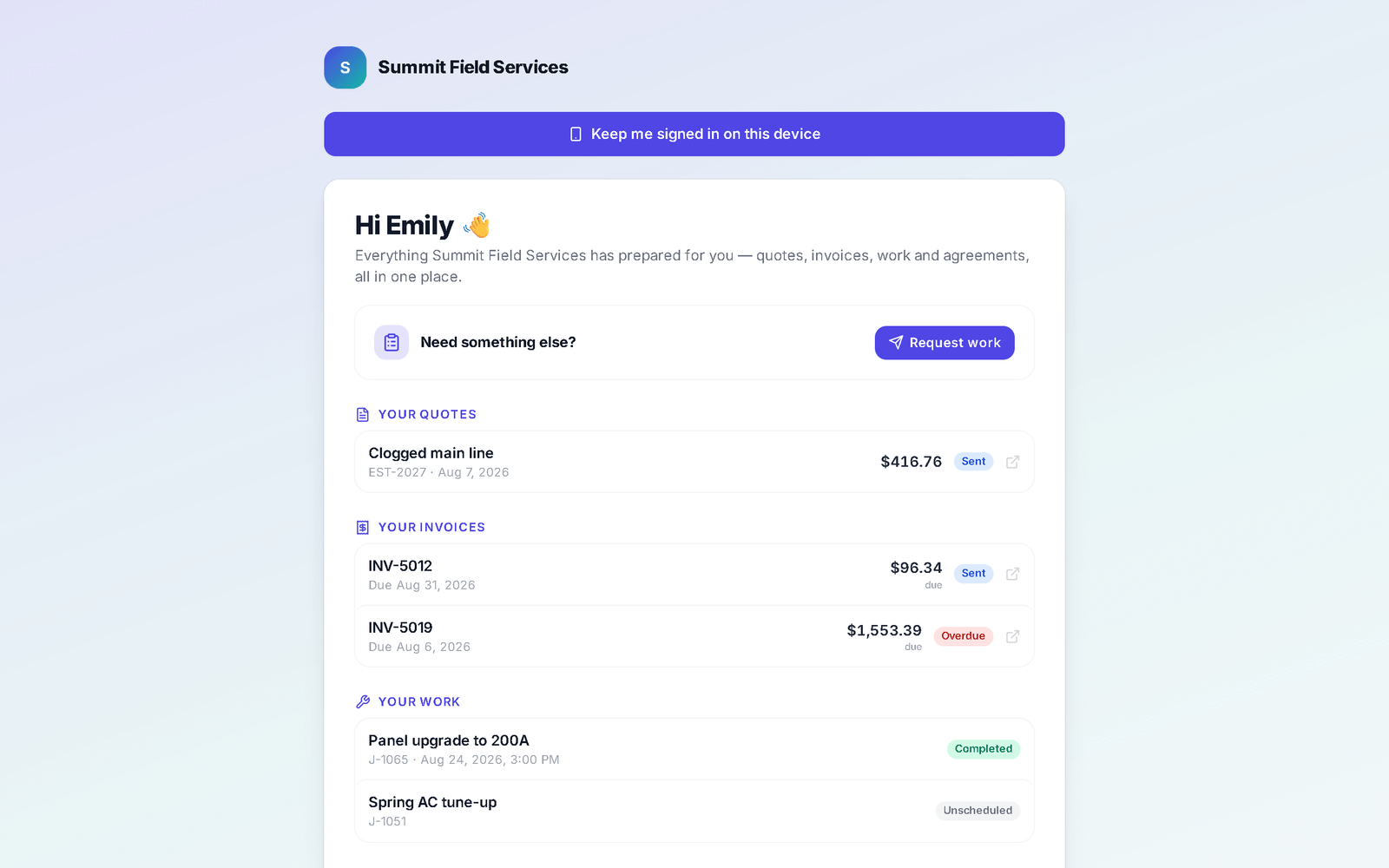
Every quote, invoice, visit and signed agreement in one branded page — where they approve and sign, pay, prep for the visit, watch the tech arrive, ask for the next job, and refer a friend.
The client hub, prep checklists and online booking start on Pro, or come as the Customer portal & online booking module on any plan — see pricing. Quote and invoice links themselves work on every plan.
What your customer can do without calling you
- 01
Approve and sign the quote
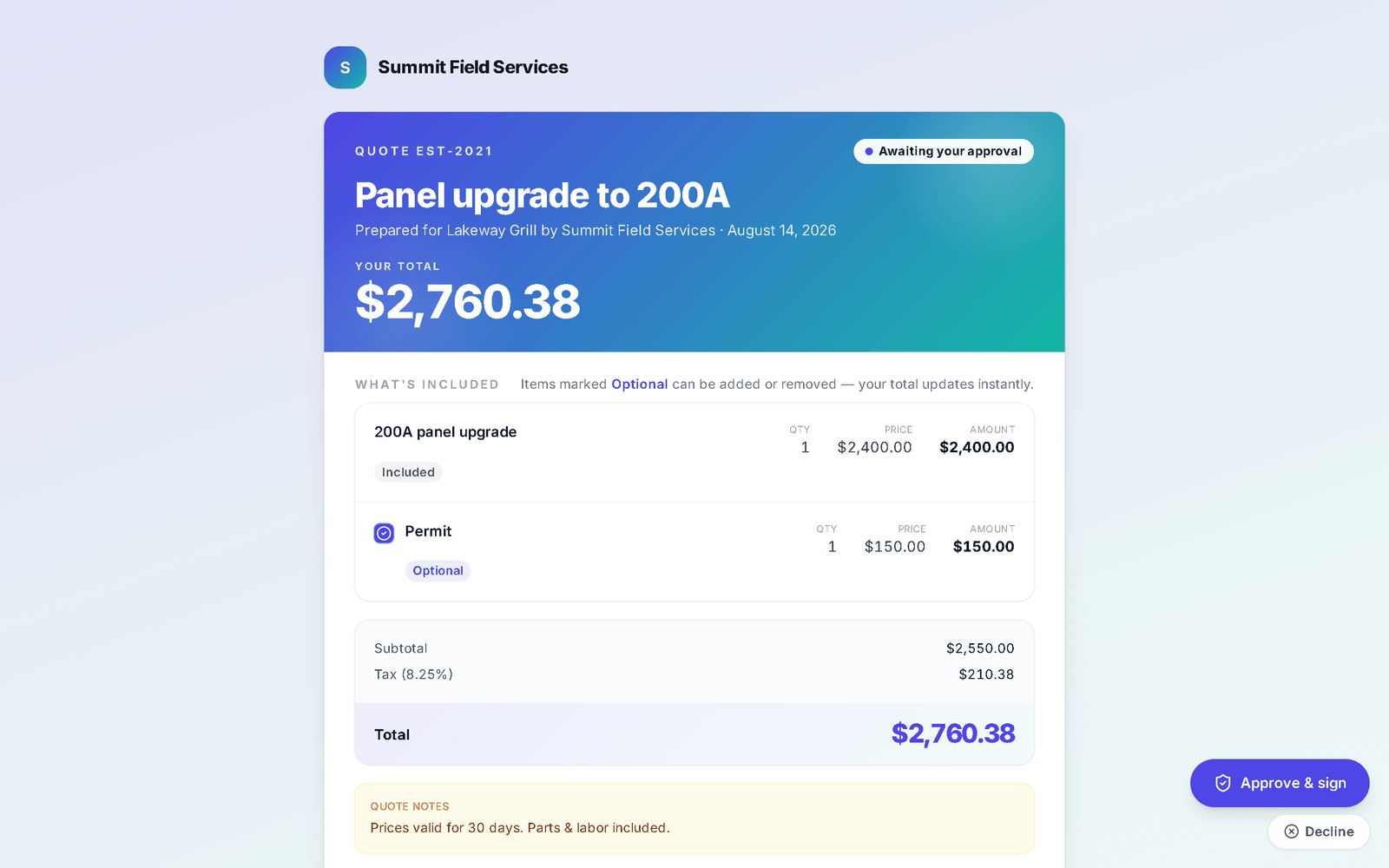
From the hub they open any quote: toggle the optional lines, read your agreement, and Approve & sign with a typed or drawn signature. If a deposit is required they see it before approving and pay it right after. When you allow it, they can message you for changes instead of declining. Their signed agreement is kept as a PDF, exactly as it was at signing, under Your signed agreements.
In the appApprove & signYour signed agreementsRequest changes on a quote
- 02
See what they owe, and pay it
Your invoices leads with the balance due — a partly-paid invoice shows what's left, with the total underneath so the math is clear. One tap opens the invoice: card on Stripe's hosted page, a tip if they like, or "I'll pay by check" so you know it's coming. See payments.
In the appYour invoicesPay by card
- 03
Prep for the visit, watch the truck
When a job is scheduled the customer gets a prep checklist — what to expect and what to have ready — and every tick syncs live, so the office knows before the truck rolls whether the attic is reachable. A finished list silences the nudge. On the day, On my way sends them a link that counts down the ETA and flips to Arrived.
In the appPrep checklist nudgeOn my wayArrived
- 04
Sign off the finished job
At the end of the job the crew hands over their phone or a QR code: the customer sees the walkthrough items that were checked in front of them and signs the sign-off right there. Their upcoming and past visits sit under Your work — with the time of day if you choose to show it.
In the appCustomer sign-offYour workShow appointment times
- 05
Ask for the next job, refer a friend
At the top of the hub: Need something else? Request work — what they need, details, a best time, and it lands in your Requests; with online booking on, a Book a time button opens your booking page with open slots in their own time zone. Turn on Refer a friend and the hub shows your headline and reward; a referral arrives as a new lead, credited to the customer who sent it. On a phone the hub can stay signed in on the device — with lock-screen alerts they control, and a sign-out that really signs out.
In the appRequest workBook a timeRefer a friendKeep me signed in on this device
Where this differs from Jobber
Only the rows where there's a real difference — including the ones Jobber wins. The full table is on the comparison page.
| Feature | My WorkQue | Jobber |
|---|---|---|
| Client hub with e-sign & part-payments | ✓ | ✓ |
| Group multiple quotes into one comparison link | ✓ with photos & deposits | — (optional line items only) |
| Website + form builder included | ✓ | — |
Based on each vendor's public feature and pricing pages plus a hands-on walk of a live Jobber account, August 2026. Plans change — verify with each vendor.
Fair questions
Do customers need an account or an app?
No. Every quote, invoice, hub, prep list and tracking page is a link that opens in any browser. On a phone the hub can also be paired to the device so it opens without the link, and the customer can sign that device out any time.
What do I control?
Which sections show — Quotes, Invoices, Scheduled work, Signed agreements — whether appointment times are shown, whether customers can request changes on a quote instead of declining, and the referral prompt with its headline and reward. All from the Client Hub (customer portal) card in Settings.
Can a customer request new work from the hub?
Yes. Request work sits at the top of the hub — what they need, details, a best time — and lands in your Requests. If your online booking is on, Book a time takes them straight to open slots. Turn requests off and the card simply isn't shown.
Is it branded?
Yes — your logo and colors on the hub, quotes, invoices, prep list, tracking page and sign-off. The address in the customer's browser is app.myworkque.com.
It all runs on the same records
A quote becomes the job, the job becomes the invoice, the payment lands in the books — no re-typing between apps.
Quotes
Templates, optional lines, e-sign and deposits.
See how it works →Scheduling & Dispatch
Calendar views, a drag-to-assign dispatch board, on-my-way texts, GPS time clock.
See how it works →Invoicing
Job to invoice in one click, deposits carried, past-due split out, reminders.
See how it works →Payments
Cards on Stripe through your own account, deposits, plans, every method recorded.
See how it works →Comparisons
Good / better / best in one link the customer compares and chooses from.
See how it works →Automations
Follow-ups and reminders that run themselves — by their real names.
See how it works →Mobile
The whole app on the phone — installed straight from the browser.
See how it works →
Give your customers one link, not five phone calls.
Start your 14-day free trial.