Good. Better. Best.
One link. Their choice.
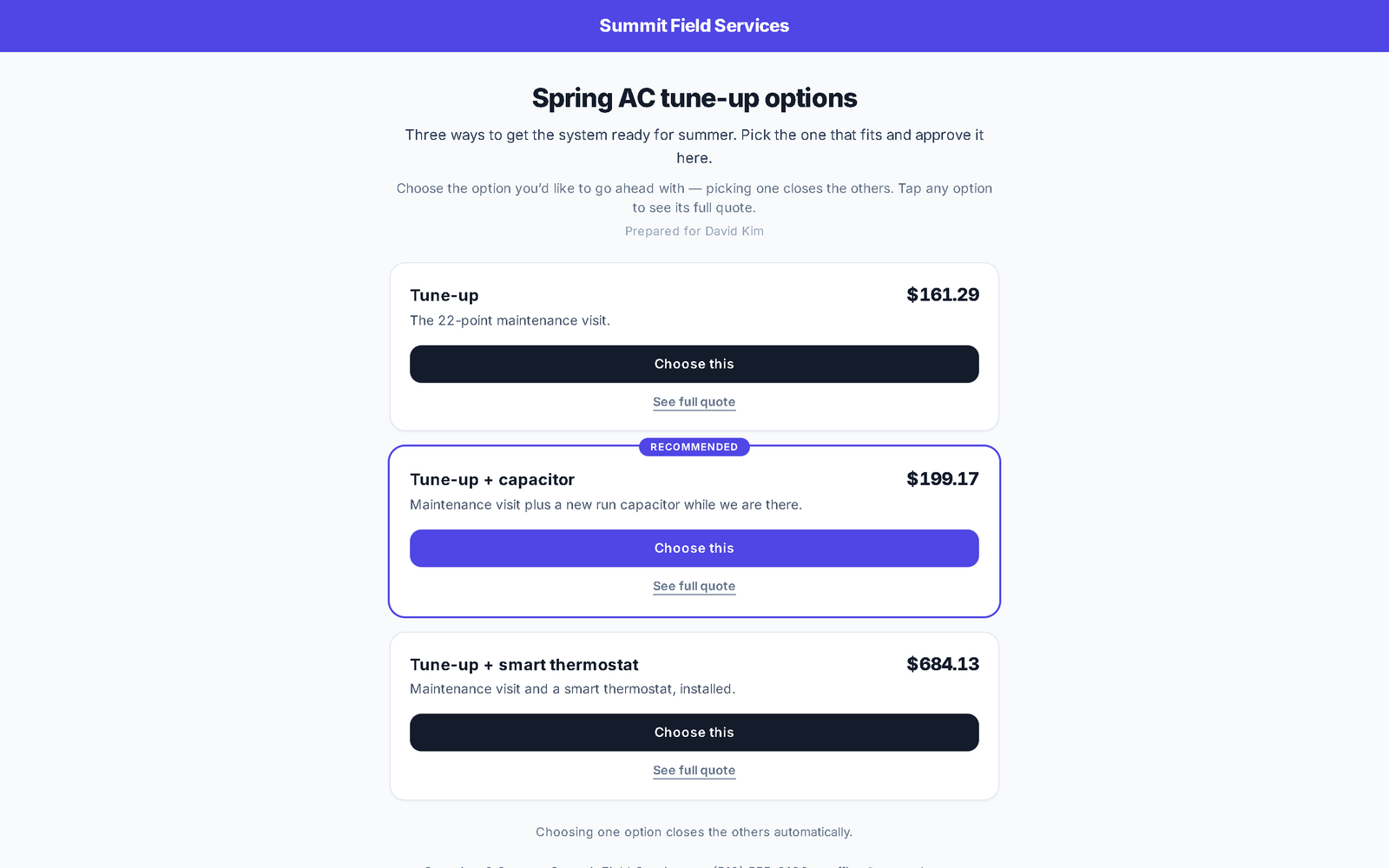
Group several quotes into one branded page. The customer sees the options with photos, prices, what's in each and the deposit to book — taps into any full quote — and chooses. Picking one closes the others.
Comparisons come with the Business plan, or as the Quote packages & compare module on any plan — see pricing.
Sell the decision, not just the price
- 01
Build good / better / best once
A comparison template is the reusable set of options — Good, Better, Best, or whatever you call them — each with its own lines (from your price book, materials along for the ride), a one-line pitch, and the option you mark as recommended. Add the compare rows customers actually decide on: warranty, SEER, brand, years — text, money or yes/no. Use it for a customer and it mints their real quotes.
In the appTemplatesMark as recommendedCustomer picks oneAll together
- 02
Or group the quotes you already wrote
Have three quotes for one customer? Select them and Group these quotes into one link. Give it a heading and an intro, drag the options into order, pick the recommended one — with a live preview beside the editor showing exactly the page they'll get.
In the appGroup these quotes into one linkPreview it as the customer
- 03
One link. Photos, prices, deposits, the lot.
The customer opens one branded page: each option as a card with its header photo, price, pitch and compare rows, the deposit to book under the price, and See full quote for the itemised scope. Sending the comparison delivers the quotes too, and the link only opens once every option is a sent quote — never a draft.
In the appSee full quote… deposit to bookCopy link
- 04
Product lines, when one ladder isn't enough
Selling two brands, or repair vs replace? Name product lines and put options in each; the customer switches lines with a pill row and compares inside the one they care about. Anything you leave out of a line still shows under a More options tab — the editor tells you when that'll happen instead of hiding it.
In the appProduct lines (optional)More options
- 05
They choose. It closes. It's signed.
In They pick one mode, choosing an option asks for the price and booking deposit to be agreed, signs it, and declines the sibling quotes automatically — one job, one deposit, no orphaned quotes. In All together mode they can approve any or all as separate jobs. Either way you see what they picked under Sent to customers.
In the appChoose thisThey pick oneSent to customers
Where this differs from Jobber
Only the rows where there's a real difference — including the ones Jobber wins. The full table is on the comparison page.
| Feature | My WorkQue | Jobber |
|---|---|---|
| Group multiple quotes into one comparison link | ✓ with photos & deposits | — (optional line items only) |
| Consumer financing offered inside the quote | — | ✓ via Wisetack |
Based on each vendor's public feature and pricing pages plus a hands-on walk of a live Jobber account, August 2026. Plans change — verify with each vendor.
Fair questions
How is this different from optional line items on a quote?
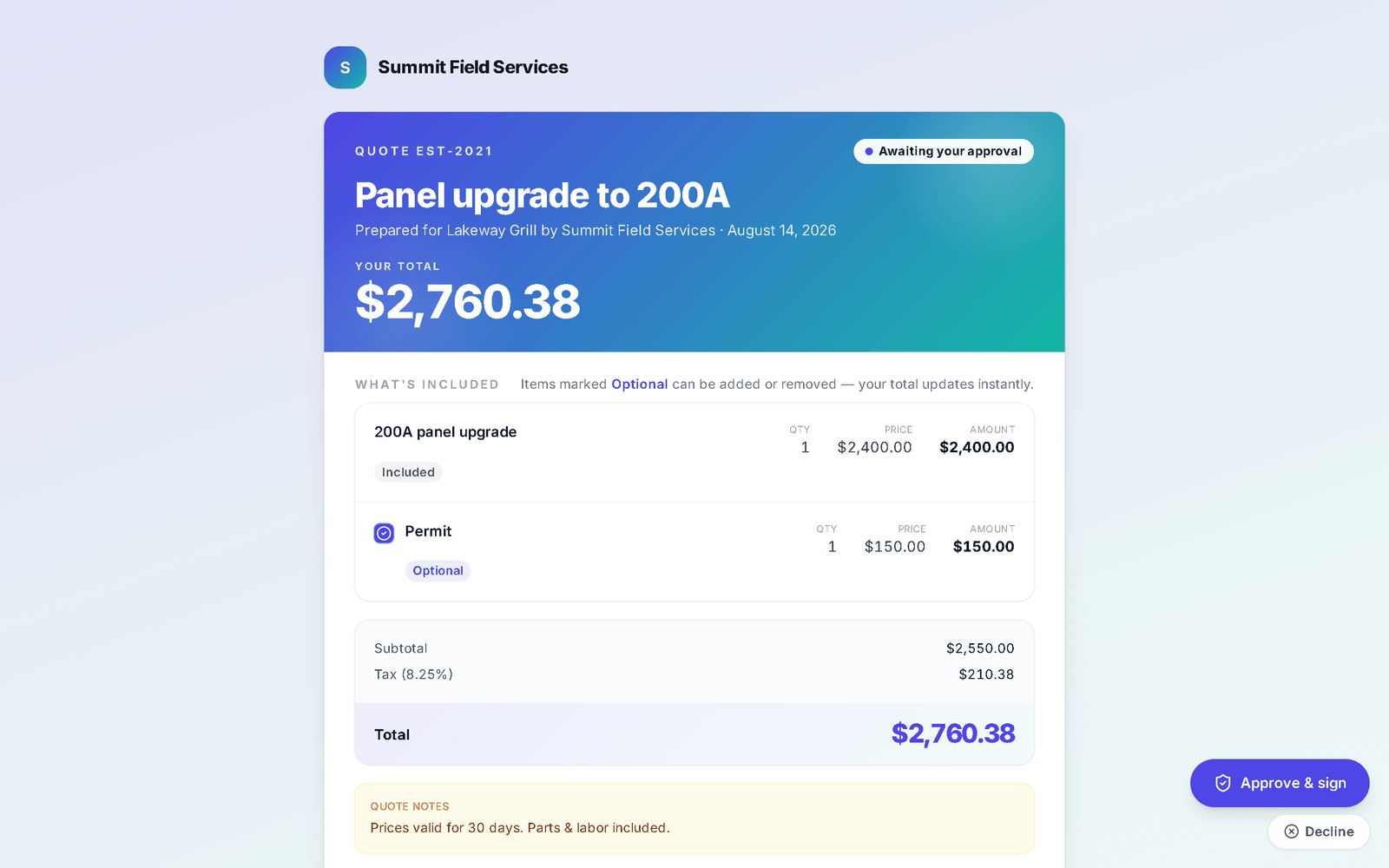
Optional lines change one quote's total. A comparison is several complete quotes — each with its own scope, photos and deposit — laid side by side, and choosing one signs it and closes the others. Jobber's quote can offer optional line items; it can't show three scoped options and let the customer pick.
What happens to the deposit?
Each option shows its own deposit to book. When the customer chooses, they agree to that option's price and deposit, sign, and are taken to pay it — and it carries through to the job and the invoice like any quote deposit. See payments.
Which plan is it on?
The Business plan includes it. On Starter or Pro, add the Quote packages & compare module — the current price is on the pricing page.
It all runs on the same records
A quote becomes the job, the job becomes the invoice, the payment lands in the books — no re-typing between apps.
Quotes
Templates, optional lines, e-sign and deposits.
See how it works →Scheduling & Dispatch
Calendar views, a drag-to-assign dispatch board, on-my-way texts, GPS time clock.
See how it works →Invoicing
Job to invoice in one click, deposits carried, past-due split out, reminders.
See how it works →Payments
Cards on Stripe through your own account, deposits, plans, every method recorded.
See how it works →Client Hub
Where your customers approve, sign, pay, prep, and refer a friend.
See how it works →Automations
Follow-ups and reminders that run themselves — by their real names.
See how it works →Mobile
The whole app on the phone — installed straight from the browser.
See how it works →
Send three options. Get one signed.
Start your 14-day free trial.